LOADING...

Category "Latest Security News"

19Aug

Emotet Malware

by intelAdmin

Systems Affected

Network Systems

Overview

Emotet is an advanced, modular banking Trojan that primarily functions as a downloader or dropper of other banking Trojans. Emotet continues to be among the most costly and destructive malware affecting state, local, tribal, and territorial (SLTT) governments, and the private and public sectors.

This joint Technical Alert (TA) is the result of Multi-State Information Sharing & Analysis Center (MS-ISAC) analytic efforts, in coordination with the Department of Homeland Security (DHS) National Cybersecurity and Communications Integration Center (NCCIC).

Description

Emotet continues to be among the most costly and destructive malware affecting SLTT governments. Its worm-like features result in rapidly spreading network-wide infection, which are difficult to combat. Emotet infections have cost SLTT governments up to $1 million per incident to remediate.

Emotet is an advanced, modular banking Trojan that primarily functions as a downloader or dropper of other banking Trojans. Additionally, Emotet is a polymorphic banking Trojan that can evade typical signature-based detection. It has several methods for maintaining persistence, including auto-start registry keys and services. It uses modular Dynamic Link Libraries (DLLs) to continuously evolve and update its capabilities. Furthermore, Emotet is Virtual Machine-aware and can generate false indicators if run in a virtual environment.

Emotet is disseminated through malspam (emails containing malicious attachments or links) that uses branding familiar to the recipient; it has even been spread using the MS-ISAC name. As of July 2018, the most recent campaigns imitate PayPal receipts, shipping notifications, or “past-due” invoices purportedly from MS-ISAC. Initial infection occurs when a user opens or clicks the malicious download link, PDF, or macro-enabled Microsoft Word document included in the malspam. Once downloaded, Emotet establishes persistence and attempts to propagate the local networks through incorporated spreader modules.

Figure 1: Malicious email distributing Emotet

Currently, Emotet uses five known spreader modules: NetPass.exe, WebBrowserPassView, Mail PassView, Outlook scraper, and a credential enumerator.

  1. NetPass.exe is a legitimate utility developed by NirSoft that recovers all network passwords stored on a system for the current logged-on user. This tool can also recover passwords stored in the credentials file of external drives.
  2. Outlook scraper is a tool that scrapes names and email addresses from the victim’s Outlook accounts and uses that information to send out additional phishing emails from the compromised accounts.
  3. WebBrowserPassView is a password recovery tool that captures passwords stored by Internet Explorer, Mozilla Firefox, Google Chrome, Safari, and Opera and passes them to the credential enumerator module.
  4. Mail PassView is a password recovery tool that reveals passwords and account details for various email clients such as Microsoft Outlook, Windows Mail, Mozilla Thunderbird, Hotmail, Yahoo! Mail, and Gmail and passes them to the credential enumerator module.
  5. Credential enumerator is a self-extracting RAR file containing two components: a bypass component and a service component. The bypass component is used for the enumeration of network resources and either finds writable share drives using Server Message Block (SMB) or tries to brute force user accounts, including the administrator account. Once an available system is found, Emotet writes the service component on the system, which writes Emotet onto the disk. Emotet’s access to SMB can result in the infection of entire domains (servers and clients).
Figure 2: Emotet infection process

To maintain persistence, Emotet injects code into explorer.exe and other running processes. It can also collect sensitive information, including system name, location, and operating system version, and connects to a remote command and control server (C2), usually through a generated 16-letter domain name that ends in “.eu.” Once Emotet establishes a connection with the C2, it reports a new infection, receives configuration data, downloads and runs files, receives instructions, and uploads data to the C2 server.

Emotet artifacts are typically found in arbitrary paths located off of the AppData\Local and AppData\Roaming directories. The artifacts usually mimic the names of known executables. Persistence is typically maintained through Scheduled Tasks or via registry keys. Additionally, Emotet creates randomly-named files in the system root directories that are run as Windows services. When executed, these services attempt to propagate the malware to adjacent systems via accessible administrative shares.

Note: it is essential that privileged accounts are not used to log in to compromised systems during remediation as this may accelerate the spread of the malware.

Example Filenames and Paths:

C:\Users\<username>\AppData \Local\Microsoft\Windows\shedaudio.exe

C:\Users\<username>\AppData\Roaming\Macromedia\Flash Player\macromedia\bin\flashplayer.exe

Typical Registry Keys:

HKEY_LOCAL_MACHINE\Software\Microsoft\Windows\CurrentVersion\Run

HKEY_LOCAL_MACHINE\Software\Wow6432Node\Microsoft\Windows\CurrentVersion\Run

HKEY_CURRENT_USER\Software\Microsoft\Windows\CurrentVersion\Run

System Root Directories:

C:\Windows\11987416.exe

C:\Windows\System32\46615275.exe

C:\Windows\System32\shedaudio.exe

C:\Windows\SysWOW64\f9jwqSbS.exe

Impact

Negative consequences of Emotet infection include

  • temporary or permanent loss of sensitive or proprietary information,
  • disruption to regular operations,
  • financial losses incurred to restore systems and files, and
  • potential harm to an organization’s reputation.

Solution

NCCIC and MS-ISAC recommend that organizations adhere to the following general best practices to limit the effect of Emotet and similar malspam:

  • Use Group Policy Object to set a Windows Firewall rule to restrict inbound SMB communication between client systems. If using an alternative host-based intrusion prevention system (HIPS), consider implementing custom modifications for the control of client-to-client SMB communication. At a minimum, create a Group Policy Object that restricts inbound SMB connections to clients originating from clients.
  • Use antivirus programs, with automatic updates of signatures and software, on clients and servers.
  • Apply appropriate patches and updates immediately (after appropriate testing).
  • Implement filters at the email gateway to filter out emails with known malspam indicators, such as known malicious subject lines, and block suspicious IP addresses at the firewall.
  • If your organization does not have a policy regarding suspicious emails, consider creating one and specifying that all suspicious emails should be reported to the security or IT department.
  • Mark external emails with a banner denoting it is from an external source. This will assist users in detecting spoofed emails.
  • Provide employees training on social engineering and phishing. Urge employees not to open suspicious emails, click links contained in such emails, or post sensitive information online, and to never provide usernames, passwords, or personal information in answer to any unsolicited request. Educate users to hover over a link with their mouse to verify the destination prior to clicking on the link.
  • Consider blocking file attachments that are commonly associated with malware, such as .dll and .exe, and attachments that cannot be scanned by antivirus software, such as .zip files.
  • Adhere to the principal of least privilege, ensuring that users have the minimum level of access required to accomplish their duties. Limit administrative credentials to designated administrators.
  • Implement Domain-Based Message Authentication, Reporting & Conformance (DMARC), a validation system that minimizes spam emails by detecting email spoofing using Domain Name System (DNS) records and digital signatures.

If a user or organization believes they may be infected, NCCIC and MS-ISAC recommend running an antivirus scan on the system and taking action to isolate the infected workstation based on the results. If multiple workstations are infected, the following actions are recommended:

  • Identify, shutdown, and take the infected machines off the network;
  • Consider temporarily taking the network offline to perform identification, prevent reinfections, and stop the spread of the malware;
  • Do not log in to infected systems using domain or shared local administrator accounts;
  • Reimage the infected machine(s);
  • After reviewing systems for Emotet indicators, move clean systems to a containment virtual local area network that is segregated from the infected network;
  • Issue password resets for both domain and local credentials;
  • Because Emotet scrapes additional credentials, consider password resets for other applications that may have had stored credentials on the compromised machine(s);
  • Identify the infection source (patient zero); and
  • Review the log files and the Outlook mailbox rules associated with the infected user account to ensure further compromises have not occurred. It is possible that the Outlook account may now have rules to auto-forward all emails to an external email address, which could result in a data breach.

Article Source: https://www.us-cert.gov/ncas/alerts/TA18-201A

25May

Change Your Twitter Password Immediately, Bug Exposes Passwords in Plaintext

by intelAdmin

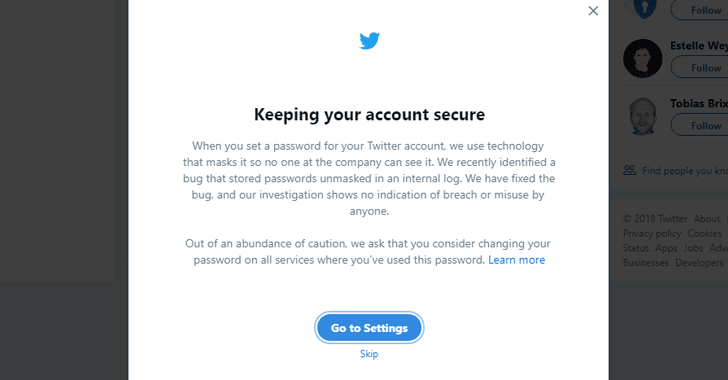
Twitter is urging all of its 330 million users to change their passwords after a software glitch unintentionally exposed its users’ passwords by storing them in readable text on its internal computer system.

The social media network disclosed the issue in an official blog post and a series of tweets from Twitter Support.

According to Twitter CTO Parag Agrawal, Twitter hashes passwords using a popular function known as bcrypt, which replaces an actual password with a random set of numbers and letters and then stored it in its systems.

This allows the company to validate users’ credentials without revealing their actual passwords, while also masking them in a way that not even Twitter employees can see them.

twitter-password-reset

However, a software bug resulted in passwords being written to an internal log before completing the hashing process—meaning that the passwords were left exposed on the company’s internal system.

Parag said Twitter had found and resolved the problem itself, and an internal investigation had found no indication of breach or passwords being stolen or misused by insiders.

“We found this error ourselves, removed the passwords, and are implementing plans to prevent this bug from happening again,” Parag said.

“We are very sorry this happened. We recognize and appreciate the trust you place in us, and are committed to earning that trust every day.”

Still, the company urged all of its 363 Million users to consider changing their passwords to be on a safer side.

How to Reset Twitter Password

In order to change your password on Twitter, click on your Profile Picture icon given in the top-right corner, then go to Settings and Privacy → Password. Now, type your current password, and enter a new one, and try keeping it stronger.

For the Twitter app for iOS and Android, click on your Profile Picture icon in the top-left corner, and then go to Settings and Privacy → Account → Change Password (“Password” on Android), and create a new, stronger password.

You should also change the password on all other services where you have used the same password.

You are also advised to enable two-factor authentication service on Twitter, which adds an extra layer of security to your account and help prevent your account from being hijacked.

11May

Microsoft Patches Two Zero-Day Flaws Under Active Attack

by intelAdmin
microsoft-patch-tuesday

It’s time to gear up for the latest May 2018 Patch Tuesday.

Microsoft has today released security patches for a total of 67 vulnerabilities, including two zero-days that have actively been exploited in the wild by cybercriminals, and two publicly disclosed bugs.

In brief, Microsoft is addressing 21 vulnerabilities that are rated as critical, 42 rated important, and 4 rated as low severity.

These patch updates address security flaws in Microsoft Windows, Internet Explorer, Microsoft Edge, Microsoft Office, Microsoft Office Exchange Server, Outlook, .NET Framework, Microsoft Hyper-V, ChakraCore, Azure IoT SDK, and more.

1) Double Kill IE 0-day Vulnerability

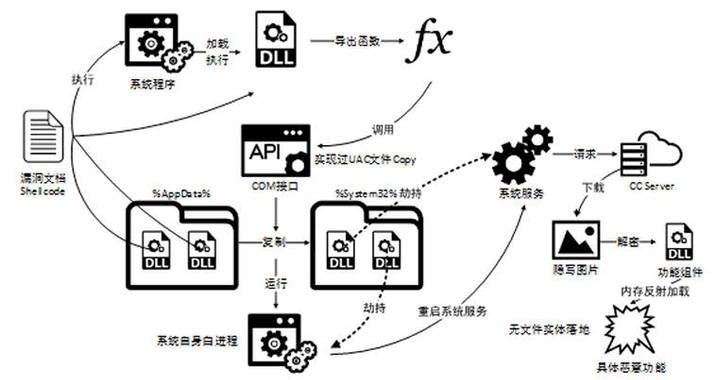
The first zero-day vulnerability (CVE-2018-8174) under active attack is a critical remote code execution vulnerability that was revealed by Chinese security firm Qihoo 360 last month and affected all supported versions of Windows operating systems.

Dubbed “Double Kill” by the researchers, the vulnerability is notable and requires prompt attention as it could allow an attacker to remotely take control over an affected system by executing malicious code remotely through several ways, such as a compromised website, or malicious Office documents.

The Double Kill vulnerability is a use-after-free issue which resides in the way the VBScript Engine (included in all currently supported versions of Windows) handles objects in computer memory, allowing attackers to execute code that runs with the same system privileges as of the logged-in user.

“In a web-based attack scenario, an attacker could host a specially crafted website that is designed to exploit the vulnerability through Internet Explorer and then convince a user to view the website. An attacker could also embed an ActiveX control marked ‘safe for initialization’ in an application or Microsoft Office document that hosts the IE rendering engine,” Microsoft explains in its advisory.

“The attacker could also take advantage of compromised websites and websites that accept or host user-provided content or advertisements. These websites could contain specially crafted content that could exploit the vulnerability.”

Users with administrative rights on their systems are impacted more than the ones with limited rights, as an attacker successfully exploiting the vulnerability could take control of an affected system.

double-kill-flaw

However, that doesn’t mean that low-privileged users are spared. If users are logged in on an affected system with more limited rights, attackers may still be able to escalate their privileges by exploiting a separate vulnerability.

Researchers from Qihoo 360 and Kaspersky Labs found that the vulnerability was actively being exploited in the wild by an advanced state-sponsored hacking group in targeted attacks, but neither Microsoft nor Qihoo 360 and Kaspersky provided any information on the threat group.

2) Win32k Elevation of Privilege Vulnerability

The second zero-day vulnerability (CVE-2018-8120) patched this month is a privilege-escalation flaw that occurred in the Win32k component of Windows when it fails to properly handle objects in computer memory.

Successful exploitation of the flaw can allow attackers to execute arbitrary code in kernel mode, eventually allowing them to install programs or malware; view, edit or delete data; or create new accounts with full user rights.

The vulnerability is rated “important,” and only affects Windows 7, Windows Server 2008 and Windows Server 2008 R2. The issue has actively been exploited by threat actors, but Microsoft did not provide any detail about the in-the-wild exploits.

Two Publicly Disclosed Flaws

Microsoft also addressed two “important” Windows vulnerabilities whose details have already been made public.

One of these is a Windows kernel flaw (CVE-2018-8141) that could lead to information disclosure, and the other is a Windows Image bug (CVE-2018-8170) that could lead to Elevation of Privilege.

In addition, the May 2018 updates resolve 20 more critical issues, including memory corruptions in the Edge and Internet Explorer (IE) scripting engines and remote code execution (RCE) vulnerabilities in Hyper-V and Hyper-V SMB.

Meanwhile, Adobe has also released its Patch Tuesday updates, addressing five security vulnerabilities—one critical bug in Flash Player, one critical and two important flaws in Creative Cloud and one important bug in Connect.

Users are strongly advised to install security updates as soon as possible in order to protect themselves against the active attacks in the wild.

For installing security updates, head on to Settings → Update & security → Windows Update → Check for updates, or you can install the updates manually.

11May

Hackers Found Using A New Way to Bypass Microsoft Office 365 Safe Links

by intelAdmin

Security researchers revealed a way around that some hacking groups have been found using in the wild to bypass a security feature of Microsoft Office 365, which is originally designed to protect users from malware and phishing attacks.

Dubbed Safe Links, the feature has been included in Office 365 software as part of Microsoft’s Advanced Threat Protection (ATP) solution that works by replacing all URLs in an incoming email with Microsoft-owned secure URLs.

So, every time a user clicks on a link provided in an email, it first sends the user to a Microsoft owned domain, where the company immediately checks the original URL for anything suspicious. If Microsoft’s scanners detect any malicious element, it then warns users about it, and if not, it redirects the user to the original link.

However, researchers at cloud security company Avanan have revealed how attackers have been bypassing the Safe Links feature by using a technique called, “baseStriker attack.”

BaseStriker attack involves using the <base> tag in the header of an HTML email—which is used to defines a default base URI, or URL, for relative links in a document or web page.

In other words, if the <base> URL is defined, then all subsequent relative links will use that URL as a starting point.

Microsoft-outlook-safelink-phishing-bypass

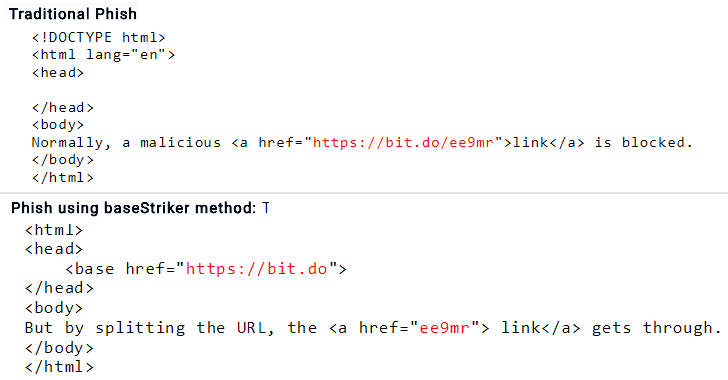
As shown in the above screenshot, the researchers compared HTML code of a traditional phishing email with the one that uses a <base> tag to split up the malicious link in a way that Safe Links fails to identify and replace the partial hyperlink, eventually redirecting victims to the phishing site, when clicked.

Researchers have even provided a video demonstration, which shows the baseStriker attack in action.

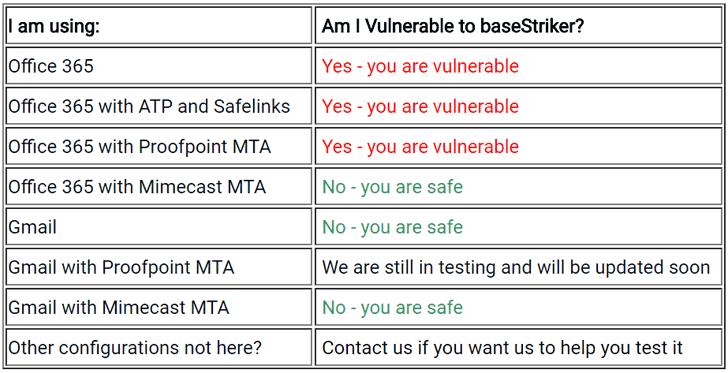
The researchers tested the baseStriker attack against several configurations and found that “anyone using Office 365 in any configuration is vulnerable,” be it web-based client, mobile app or desktop application of OutLook.

Proofpoint is also found vulnerable to the baseStriker attack. However, Gmail users and those protecting their Office 365 with Mimecast are not impacted by this issue.

So far, researchers have only seen hackers using the baseStriker attack to send phishing emails, but they believe the attack can be leveraged to distribute ransomware, malware and other malicious software.

office-365-safe-links

Avanan reported the issue to both Microsoft and Proofpoint earlier last weekend, but there is no patch available to fix the problem at the time of writing.